Overview
This page goes over several important concepts needed for understanding the tool.
Museum level
For example use and interactive playgrounds, visit the Museum map packaged with the example project
(Content/Museum/Maps/Museum).
Glossary
Here is a list of key terms used throughout the plugin and documentation:
- two types of parts in a voiceline:
- Invariant: always the same (e.g. “Our first contenstant comes from…”)
- Interchangeable: varies based on context (e.g. “…the Netherlands”)
- Inflection: a way of voicing a word or expression
- For example, English statements end with a downwards inflection ↘.
- Priority Queue: a data structure maintaining (in our case) prioritised voiceline sequences
- to enqueue something is to place it into consideration, before the highest priority element is selected


Diagram of information flow between the plugin’s elements
Voicelines
The commentary consists of individual voicelines carrying audio (to be played) and text (to be displayed as subtitles). Each voiceline represents an in-game event defined in the voicelines data table.
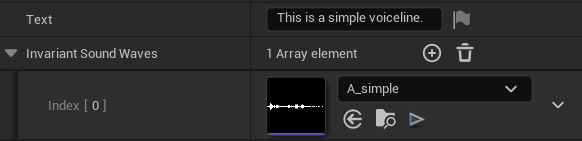
Voiceline variants
To avoid repetition, a voiceline may define multiple variants. This is especially useful for common in-game events. When such a voiceline is to be played, the system selects a variant at random (but uniformly), and even guarantees that no variant ever plays twice in a row.
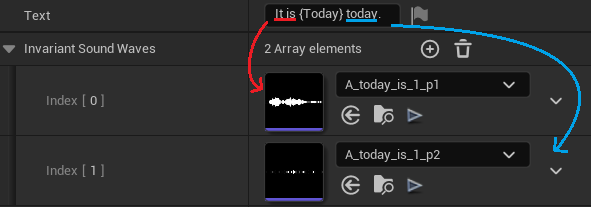
Voicelines can refer to interchangeable content in their text (as a {variable}). The appropriate content is then inserted into the voiceline based on specific context. When defining a voiceline’s audio, only invariant parts (those that stay the same) are stored in the data table.
Finally, the data table may specify a voiceline’s priority, expiration, and cooldown (see priority queue).
Interchangeables
Interchangeables are nouns (or other expressions) that vary depending on context. These get inserted into voicelines, so that not all possible combinations have to be recorded in advance. Possible use cases include names of competitors, numbers of points, time remaining, distances, et cetera.
Interchangeable content is stored in another data table. Each interchangeable has a text for subtitles and some audio.
Inflections (ways of saying)
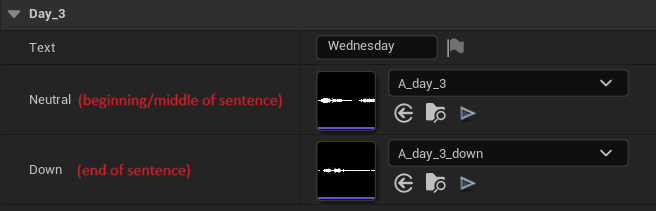
How a single word sounds depends on how it is used. For instance, it is voiced differently at the beginning or at the end of a sentence.
Interchangeables may define a different sound for each inflection, so that they can be used in various sentences.
Voicelines then specify which inflection should be applied (e.g. {Today:down} for a downwards inflection).
Voiceline Sequences
Some in-game events are worthy of more than just a short remark. Instead, they may require multiple voicelines to cover, or may need to engage with other systems (such as the camera, crowd, or instant replays). For this reason, voiceline sequences are used to represent events. They objects which play voicelines.
There are two basic types of sequences available:
- Single Voiceline Sequence – plays just a single voiceline
- Multi Voiceline Sequence – plays an array of voicelines in sequence
Scripting more complex sequences (possibly integrating with other systems) is supported through inheritance – see Custom Sequences.
Priority Queue
In many sports games, multiple events may be occuring at the same time. However, some will be more interesting to narrate than others. For this reason, voicelines are not played outright when an event occurs. Instead, a voiceline sequence is enqueued into the priority queue. Once the currently played sequence is over1, a new one is selected among those in the queue.
To inform the process of selecting the most relevant voiceline sequence, there are 3 properties that may be specified:
- Priority (integer): the highest priority sequence is selected (if there are multiple highest, a random one among them is chosen)
- Expiration (in seconds): the duration for how long the sequence stays in the queue, after which it is no longer deemed relevant (if set to 0, the sequence never expires)
- Cooldown (in seconds): the duration until the sequence may play again – if the same event2 was narrated recently, the new sequence will stay and wait in the queue
*Performance consideration
The queue is designed to be able to hold many sequences at a time (the selection procedure will remain fast by using a heap). Sequences are lightweight objects, so running out of memory is also unlikely. However, the sequences are moved in and out of cooldown explicitly, so keep in mind that having too many copies of the same sequence with a cooldown might lead to a performance hit.
The priority queue is accessible from Blueprint (or C++) through the Commentary Subsystem. It is attached to the World, meaning that the queue is cleared when switching to a new map.
Output Actors
To fit the needs of different projects, voiceline playback is handled separately, in a modular fashion. Different Output Actors subscribe to new voicelines being played and communicate them to the player.
There are two Output Actors available out of the box that you can add to your maps:
- BP_CommentaryAudioPlayer: plays the voiceline’s audio, stitching together its SoundWaves
- BP_CommentarySubtitleDisplay: displays the voiceline’s text as subtitles through a widget
If you want to customise the subtitle widget or implement your own ways to respond to played voicelines, see Custom Outputs.
Project Settings
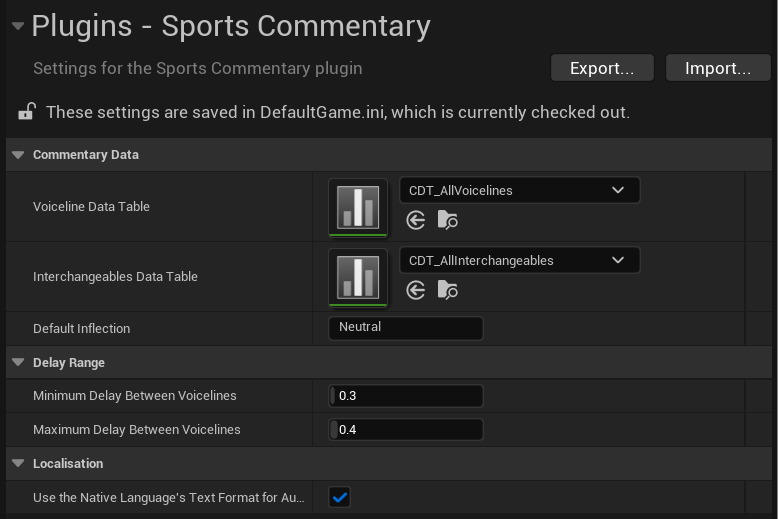
Global settings for the plugin are controlled from Project Settings (look for Sports Commentary under Plugins, likely near the very bottom). These settings are important for setup, but also allow you to tweak the system to your needs.
-
Sequences may either end naturally or be interrupted. For how to use Interruptions, see the page in the advanced section. ↩
-
For a sequence to be on cooldown, only its name has to match a previously played sequence. Specific context may differ. ↩