Interruptions
The game state can change quickly in a sports game. Important events may happen at unexpected times. To quickly respond to the latest developments, it may be necessary to interrupt what is currently being narrated.
As different games will have different needs for when and how to interrupt, the plugin does not force a specific solution.
Instead, it provides the tools to script interruptions the way that suits your project.
Any sequence may be interrupted by calling its Interrupt event which (by default) causes it to immediately Finish.
There are two main types of interruptions to consider – mid-sequence and mid-voiceline. Interrupting mid-sequence is useful for cleanly cancelling long monologue. Interrupting mid-voiceline is the most responsive, but may sound jarring if not handled carefully.
Example use: Interruptions in the Museum and Demo
In the Museum map, stepping on a new pad interrupts the currently played sequence mid-voiceline. While this may sound abrupt, it immediately responds to the user and works well for the demonstration.
The Demo map features a horse-race, which is already a fast-paced sport with very short sentences in the commentary. For this reason, finishing a thought and interrupting only mid-sequence sounds more natural. The one place this is used is for the long BP_GoOverPositionsSequence. If an important event occurs while it is playing, the sequence is set to end prematurely.
Interrupting mid-sequence
This approach stops a custom sequence in-between two voicelines, leaving the speech intact.
To have a sequence interrupt this way, handle the logic in its OnVoicelineEnded event, like in the example:
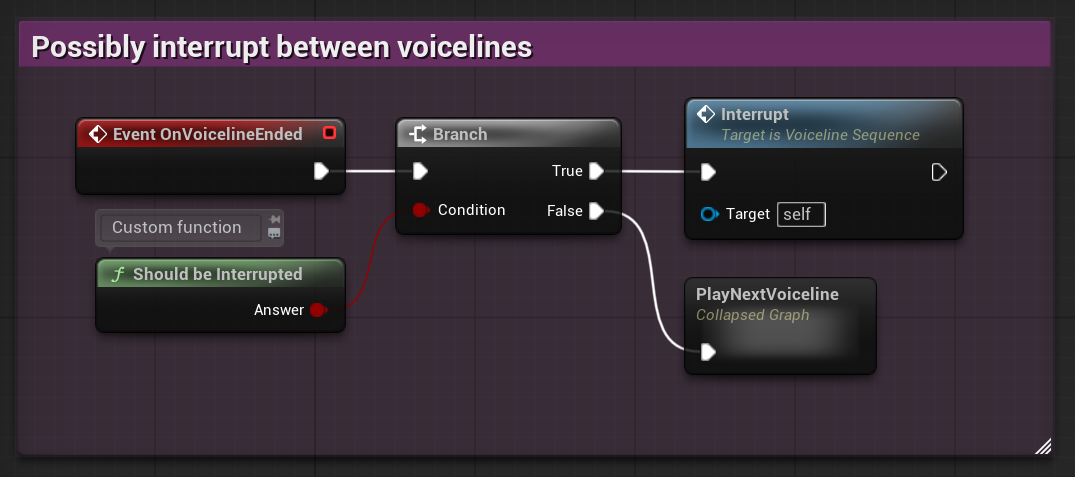
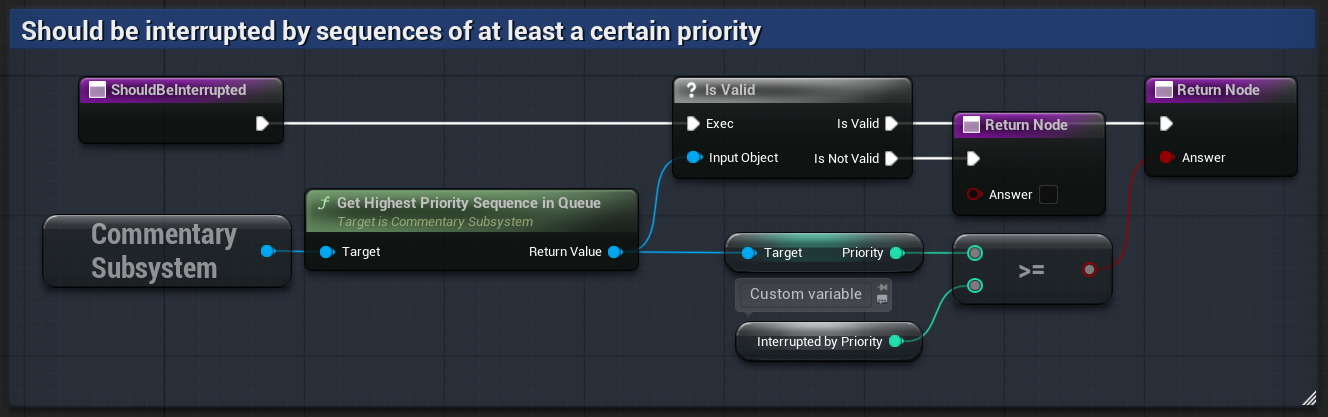
To determine whether the sequence should be interrupted, it may be useful to inspect which sequence would be played next.
You can access it by calling the subsystem’s GetHighestPrioritySequenceInQueue:
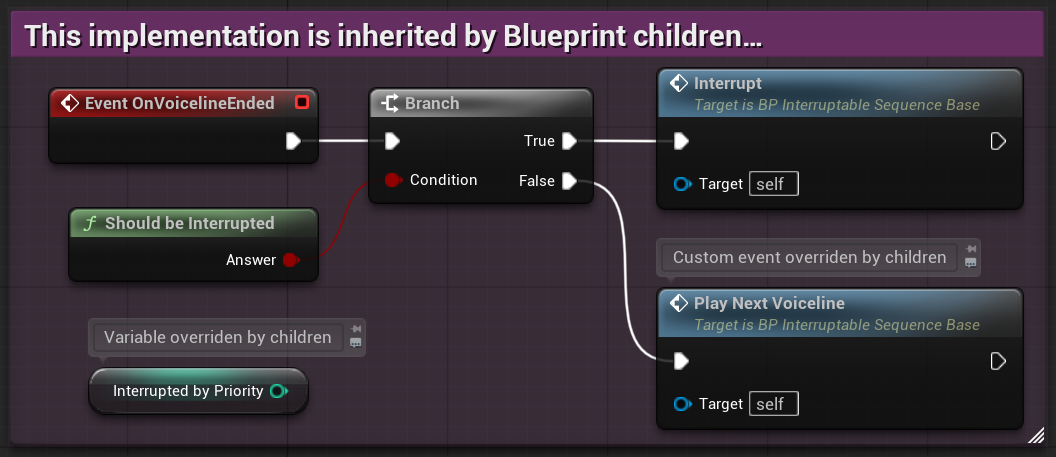
Sharing interruption behaviour through inheritance
If you want several sequences to be interrupted this way, consider defining the logic in a generic sequence and inheriting from it. See below for an example implementation of the parent:
Interrupting mid-voiceline
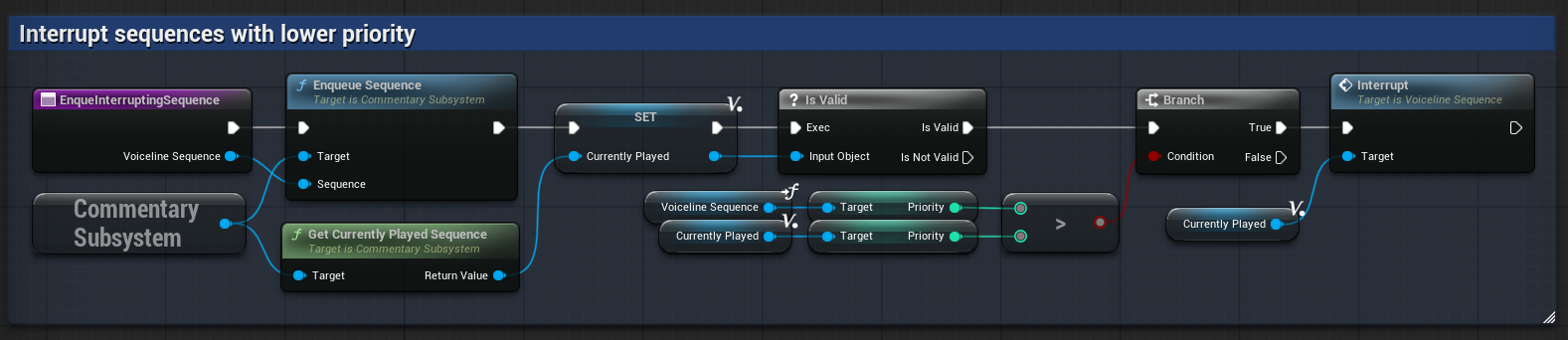
Commentary for certain top-priority events may be too important to delay. In cases like this, it can be appropriate to stop a sequence immediately, even if a voiceline is still playing.
This can be done by accessing the currently played sequence with the subsystem’s GetCurrentlyPlayedSequence and calling Interrupt on it:
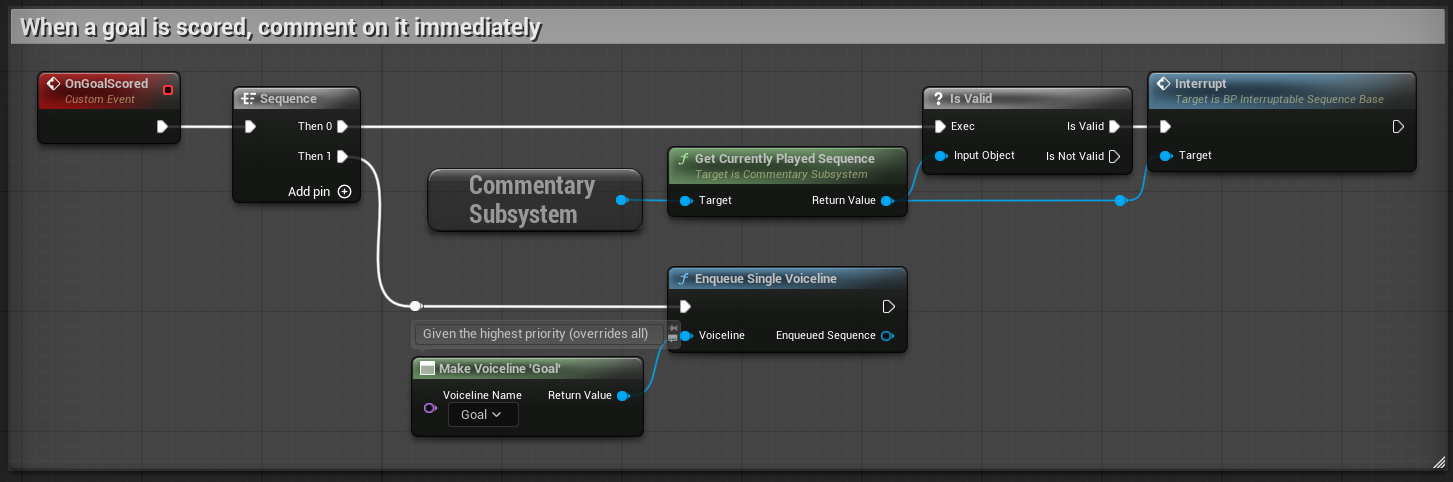
You may wish to check the sequence’s priority or other parameters before deciding whether to interrupt it. Also keep in mind that for the newly enqueued sequence to play, it must have the highest priority in the queue and not be on cooldown!
Sharing interruption behaviour through a function library
If you want to interrupt mid-voiceline universally, consider defining the logic in a shared function (like a Blueprint Function Library). See below for an example implementation of such function:
Handling interruptions
The default behaviour of the Interrupt event is just to call Finish. This gives up the sequence’s control of playing any new voicelines,
effectively terminating it. You may however override the event for custom sequences to handle interruption differently.
Here are a few example use cases:
- Sequence that cannot be interrupted – when
Interruptis called, does nothing - Transitioning with a voiceline – plays a new voiceline to create a transition (and sets itself to Finish right after)
- Cleaning up – before
Finishing, reverts any changes made by the sequence1
-
This is used in the Demo’s
BP_GoOverPositionsSequenceto destroy the visual arrow indicator. ↩