Custom Outputs
The plugin comes with two Output Actors (one for playing audio, another for displaying subtitles).
On this page, you will find how to customize the widget used by BP_CommentarySubtitleDisplay, and also how to create a fully
custom output outright.
Customising the Subtitle Widget
Start by creating a new Blueprint as a child of the SubtitleDisplay widget class.
Or if you’d prefer to just edit the example, you can make a copy of WBP_SubtitleDisplayExample.
Next, add a Text widget for your subtitles and give it the name “SubtitleBlock”. If you open the Bind Widgets window, you should now see a green tick (✓) confirming the text is bound properly.
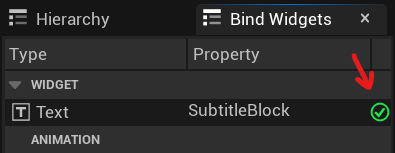
Proceed with tweaking the widget however you please! There is no need to script any logic, but if you want to
change the default behaviour, you can override the NewVoicelinePlayed and VoicelineFinishedPlaying events.
Finally, select the BP_CommentarySubtitleDisplay actor in your map and change the SubtitleDisplayClass to your own!
Another value you may want to tweak is the ExtraDurationToKeepSubtitle which controls for how long to keep subtitles visible
when no voiceline is playing (unless you change the logic).
Creating a custom Output Actor
You may want to use your own subtitle/audio solution or perhaps respond to played voicelines in a completely different way. If that is the case, all you need to do is to access the Commentary Subsystem and bind to its OnVoicelinePlayed delegate.
This event is called each time a new voiceline is played, and gives you access to the played voiceline’s properties:
- Text – a transcription of the voiceline
- SoundWaves – an array of the voiceline’s sounds (meant to be stitched together consecutively)
- Recipe – a structure containing the voiceline’s Name (row name in the data table) and Context (a name map of variables to interchangeables)
Also useful might be the GetDuration function (literally a sum of durations of the sound waves).
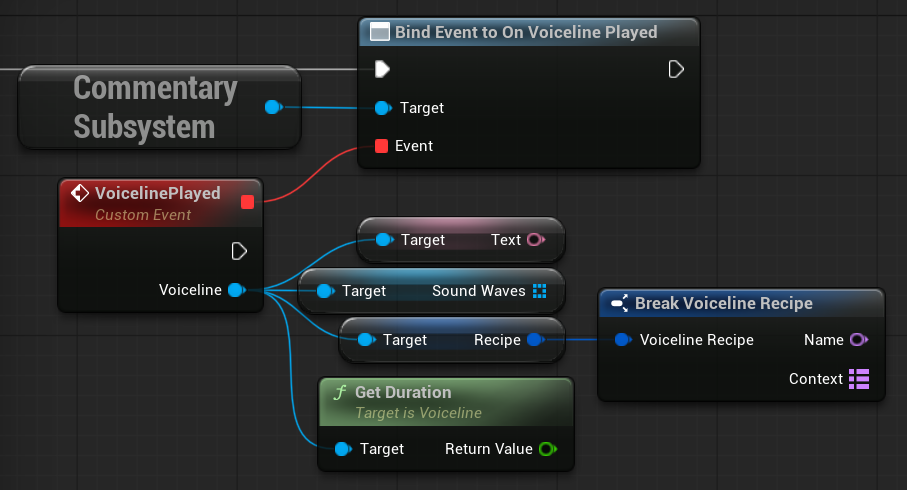
For example implementations, you can inspect the plugin’s BP_CommentaryAudioPlayer and BP_CommentarySubtitleDisplay.