Custom Sequences
Apart from using the built-in SingleVoicelineSequence and MultiVoicelineSequence, it is also possible to create custom ones. These can be both generic (working with some voicelines as input) or made for a specific in-game event (specifying voicelines inside the sequence).
Creating custom sequences is an effective way of connecting the commentary with other game systems. Another important use case is when played voicelines need to depend on the most recent game state (mid-sequence). Lastly, you may want to create one just for the ease of re-using a sequence in different places.
Example use: Custom sequences in the Demo
The demo map uses custom sequences for 5 different game events. A notable example is the BP_GoOverPositionsSequence, which plays a series of voicelines based on current relative positions of racers. It also connects with another feedback system: moving around an arrow as a visual aid.
As all the sequences rely on context of the race, they inherit from BP_RaceAwareVoicelineSequence which has a reference to the BP_RaceCommentator.
Quick overview
All voiceline sequences inherit from the VoicelineSequence class. As any other object, it may Expose on Spawn some of its variables, which is a useful way to ask for input.
The lifetime of a sequence looks like this:
- The sequence is constructed during scripting.
- Just before the sequence is enqueued, it can still
Setupits properties. - When
Startis triggered, the sequence plays its first voiceline. - Each time
OnVoicelineEndedis triggered, the sequence plays a new voiceline. - Once the last voiceline finishes playing, the sequence must
Finish.
Detailed lifetime for programmers
- The sequence is constructed during scripting.
- When the sequence is about to be enqueued, the Commentary Subsystem calls its
Setupevent. It gains a reference to the world. - The sequence waits in the queue. It is removed if it expires or if the queue is cleared.
- When the sequence is selected, the Commentary Subsystem lends it the ability to
PlayVoicelines. - The sequence’s
Startevent is called. The sequence shouldFinishor play its first voiceline. - Each time a voiceline finishes playing
(plus after the adjustable delay between voicelines),
OnVoicelineEndedis called. The sequence should eitherFinishor play another voiceline. - Once the sequence
Finishes, control is passed back to the Subsystem, which selects a new sequence to play.
Note that while a sequence is playing, it may also be Interrupted – by default, that means it
Finishes immediately.
Setting up a custom sequence
First, create a new Blueprint as a child of VoicelineSequence. If your sequence needs any inputs, add them as Expose on Spawn variables.
Second, set up the sequence’s properties, either in Class Defaults or in the Setup event (Functions → Override → Setup):
- Name (case insensitive) – used for determining which sequences share a cooldown
- Priority (integer), Expiration (in seconds), Cooldown (in seconds) – see Priority Queue
Using properties from the Voiceline Data Table
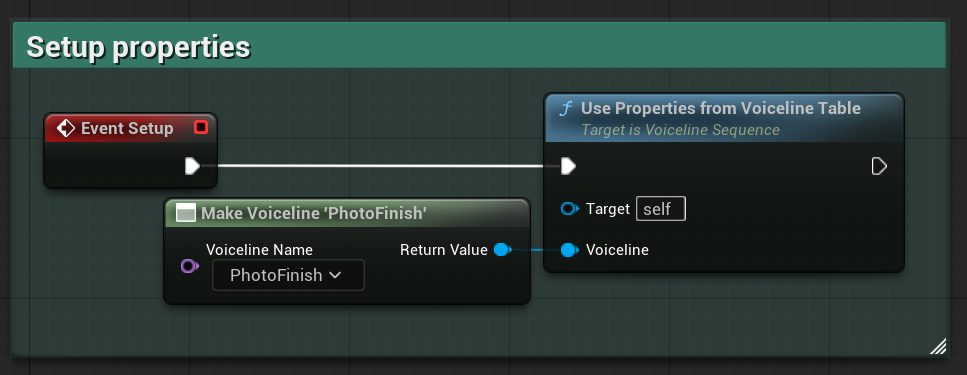
If you would rather copy properties of a voiceline, you can call UsePropertiesFromVoicelineTable in the Setup event. Note that this is also what Single- and MultiVoicelineSequence do with the (first) input voiceline.
Playing voicelines
Next, override Start and play the first voiceline by calling PlayVoiceline. You should not play more than one
voiceline just yet, since it must first finish playing.
Then, you can override OnVoicelineEnded and play the next voiceline from there! To vary which voiceline plays each time, consider using a MultiGate node or maintaining some variable.
Important: remember to call Finish!
After the last voiceline finishes playing, you must call the Finish function! Otherwise, the sequence will keep “playing” forever, and no new sequence will ever play.
Examples
A good way to get started is to see how other sequences are implemented.
Below is a simple example from the Museum (BP_TurnBulbSequence) which can be also viewed in-engine or on BlueprintUE.com.
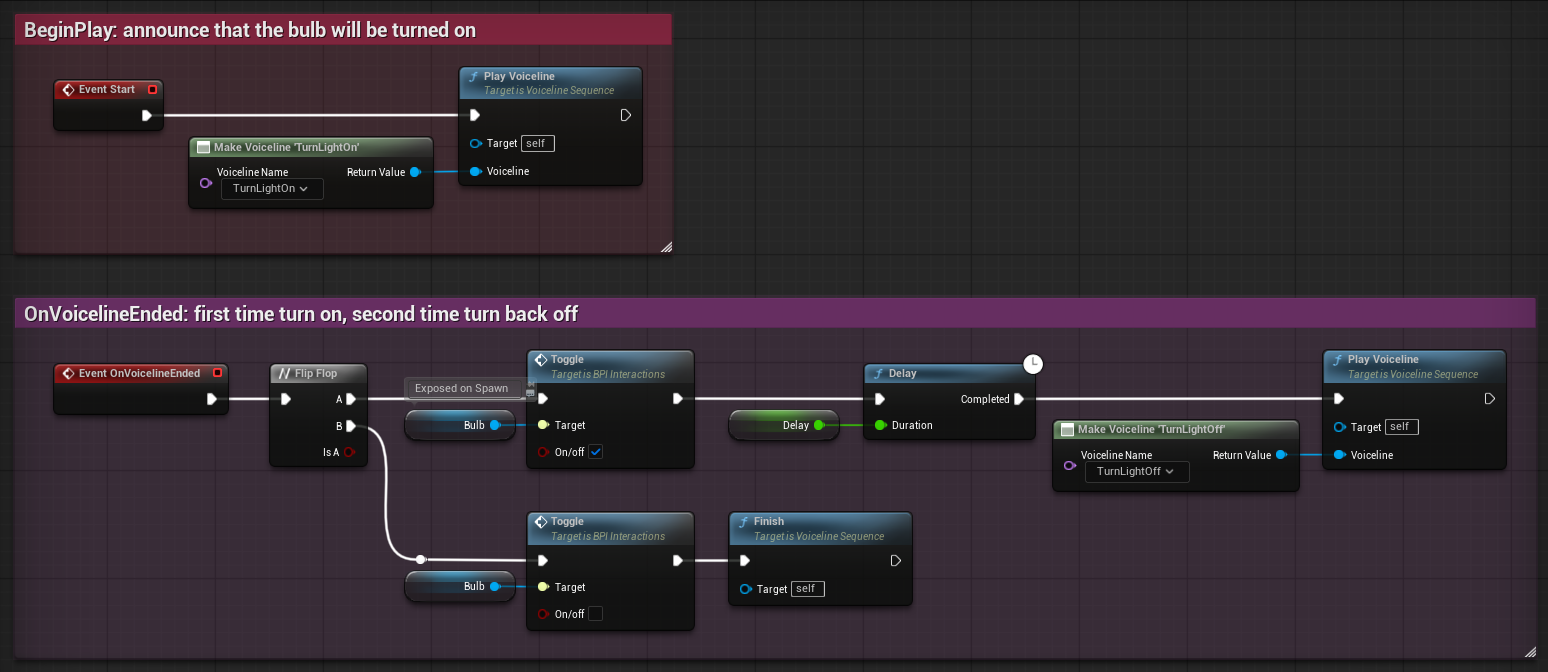
Furthermore, consider inspecting the code of Single- and MultiVoicelineSequence. They are written in Blueprint for this very purpose! You can quickly find them by searching with Ctrl + P.
Enqueueing custom sequences
For how to script when custom sequences should be enqueued, see enqueueing a sequence under Scripting.